


Blog
How to Wrap Car Rear Bumper with MOZX: Complete Step-by-Step Guide.

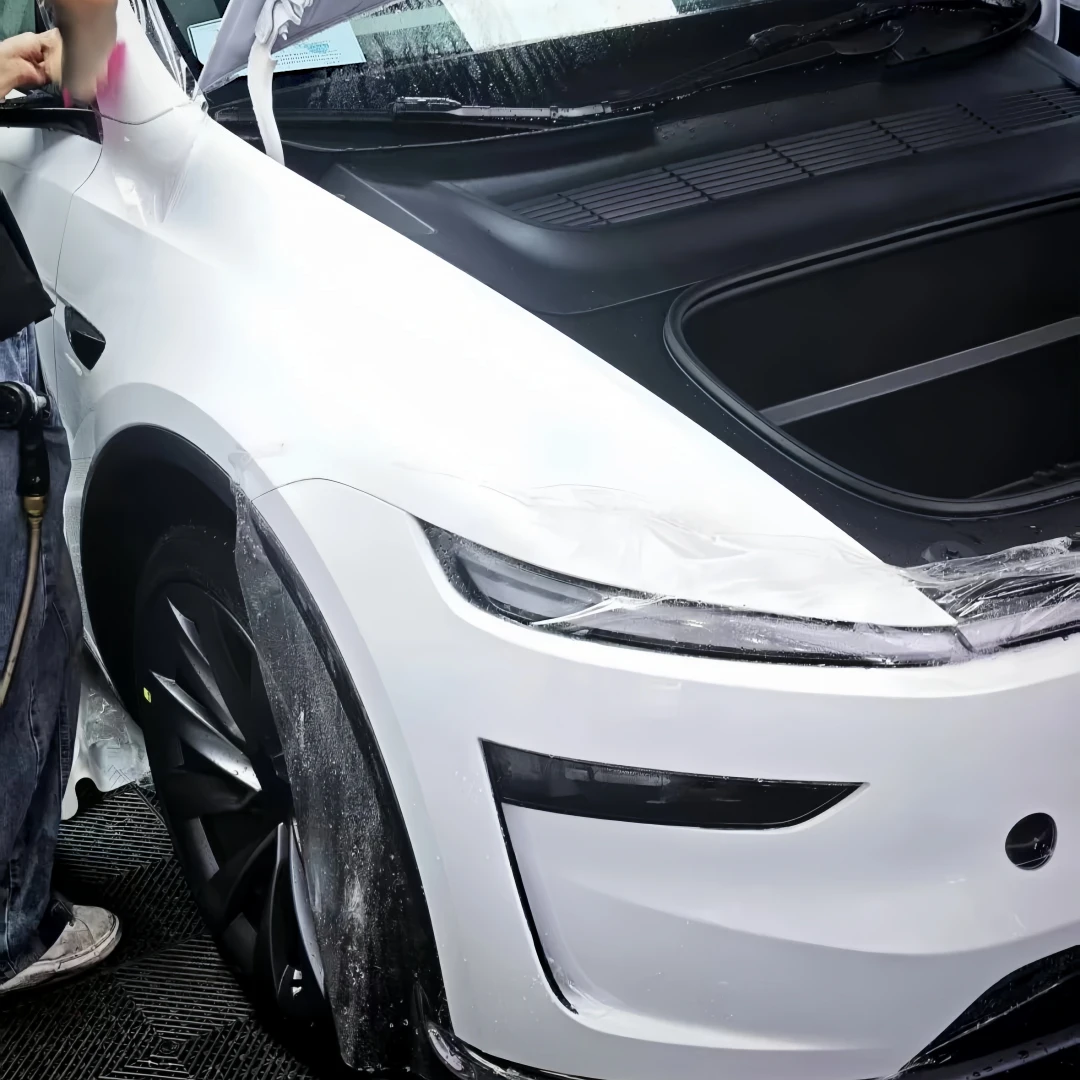
PET Color-Changing Film | Complete Installation Steps for Tesla Model 3/Y Front Bumper
PET Characteristics: High rigidity, poor ductility; localized strong stretching is strictly prohibited, as the material is highly prone to shrinking and curling after stretching. Challenges with the Tesla front bumper: deep grooves at the corners of the headlights on both sides, the wheel arch corners, the lower grille, the radar area, and the tow cover—all featuring multiple composite surfaces and numerous stress concentration points.
Environment: Dust-free workshop at 18–25°C; front bumper at room temperature (installation on a heated bumper is prohibited); thorough pre-installation car wash and full-vehicle degreasing must be completed.
Tools: Heat gun (280–320°C), soft and hard squeegees with pads, utility knife, 75% alcohol, masking tape, air blower, lint-free cloth; no thick adhesive residue is allowed in the radar area.
Front Bumper Pre-Treatment (Top Priority)
- After a thorough wash of the entire vehicle, degrease the front bumper, headlight corner grooves, trailer cover gaps, inner wheel arches, and the area around the grille twice with 75% alcohol. Use a detail brush and air blower to thoroughly remove all dirt, sand, and wax residue from gaps and grooves; dust can cause specks or peeling edges.
- Inspection: Check that the radar cover, parking sensor probes, and trailer cover latches are secure; ensure no thick adhesive residue remains in the radar area; the film should cover the area normally without overlapping layers.
- Masking: Apply masking tape to the headlight lenses, front grille, parking sensor probes, the inner side of the trailer cover, and the gaps where the bumper meets the fenders to prevent the cutting knife from scratching plastic parts.
- Film Cutting: Cut the entire sheet to fit the bumper, leaving a 5–7 cm overlap on all four sides; allow ample excess material at the headlight corners and wheel arch areas; prioritize cutting a single, continuous sheet to minimize seams.
Optional Approach: For a flawless finish, remove the front bumper for installation; when installing on the vehicle, ensure the sensors and wiring harnesses are well-protected—do not pry them open forcefully.
Film Application and Overall Alignment (Two-Person Operation)
- Leave the PE protective film on the surface of the PET film; do not completely peel off the backing paper. Two people should lift the film and position it suspended over the front bumper, aligning it centrally with even margins on all four sides. Guide large wrinkles toward the sides and bottom edge of the bumper; do not leave wrinkles on the large central surface.
- Peel back only 20–30 cm of the backing paper along the top edge of the bumper (where it meets the hood) to temporarily secure it at the center; Do not peel off the entire liner at once; PET has high initial tack, and once it adheres firmly, adjustments cannot be made.
Peel the liner in sections; remove air bubbles from large, flat surfaces
- Starting from the positioning point at the top edge, peel the liner in sections, 30–40 cm at a time, gradually working downward.
- Use a squeegee with a protective film to smooth the film, pushing air bubbles out in a radial pattern from the center to the edges; prioritize ensuring the large, flat upper surface of the front bumper lies flat.
- Do not apply firm pressure to the curved areas on both sides, the headlight corner grooves, or the lower center grille area for the time being; leave any wrinkles in the areas not yet covered.
Do not forcefully smooth out wrinkles with the squeegee; permanent creases cannot be repaired and will require rework.
Handling the deep grooves at the corners of the headlights on both sides (Tesla’s greatest challenge, PET core)
PET Principle: Heat the entire area to soften it, spread the creases in a “figure-eight” pattern, and feed the film into the recesses; do not pull forcefully at a single point. Keep tension on the film as low as possible in the recesses—the greater the stretching, the more severe the rebound will be later.
- Lift the film completely off the surface at the headlight corners, leaving it suspended. Use a heat gun to evenly heat the entire area from a distance at 280–320°C; do not focus the heat on a single spot, but ensure the film softens uniformly.
- Break up large folds into fine, small creases to distribute tension laterally. Feed the film diagonally downward into the groove; do not force it into the groove. Keep the film relaxed; after it has cooled naturally and the tension has been released, use a scraper to gently define the contour. Never press it tightly to lock in stress while it is still scalding hot after heating.
- Key points for cutting sharp corners: Cut a rounded transition at the corner where the blade meets the edge; do not cut sharp, right-angle corners. Feeding the film into a right-angle groove is highly prone to cracking and springback.
- First, shape the outer contour of the groove to ensure the film is not taut, then feed the film into the groove in small increments; completely remove all air from the groove—do not leave any air bubbles.
Mistake: Forcibly pulling the film in localized areas to fill the groove. While this may appear smooth initially, the groove edges will curl and turn white within 1–2 weeks.
Application at Wheel Arch Corners, Lower Center Mesh, and Trailer Cover Areas
- Wheel arch corners: Peel back the film and heat it evenly to soften it, distributing stress across the larger surface area to avoid localized tension at the corners; Guide any excess wrinkles toward the edge of the bumper trim; leave sufficient overlap allowance on the inner side of the wheel arch.
- Around the lower center grille: Cut along the opening of the center grille, and round the corners as well; do not stretch the film too tightly—leave a slight amount of give for expansion; press the film firmly against the edges of the center grille to prevent dust accumulation and curling later on.
- Trailer Cover: First, align the trailer cover’s outline and apply the film loosely; when cutting the trailer cover opening, leave a 3–4 mm allowance; do not press or force the film tightly at the hinge areas—leave room for movement, otherwise opening and closing the cover will tear the film.
Overall Trimming and Edge-Wrapping Allowance
After ensuring the film lies flat without bubbles on large surfaces, grooves, and corners, begin trimming:
- Cut along the outer edge of the bumper contour, leaving a uniform 7–10 mm overhang for edge wrapping; cutting flush with the paint is strictly prohibited;
- Use a shallow cutting angle, with the blade tip facing the film side, to avoid scratching the plastic body of the bumper;
- Round all corners—including those around lights, wheel arches, and the trailer cover—and avoid creating sharp, right-angle cuts;
- Remove all cut-off scraps to prevent particles from falling into crevices.
Edge Wrapping + PET Forced Post-Heating Setting (Key to Preventing Shrinkage)
- Fold the 7–10 mm excess film material into the inner side of the bumper flange; use a soft scraper and finger sleeve to gradually compact the edge wrapping section by section—work in small segments rather than pressing the entire edge at once.
- Post-heating setting (PET is essential): After the entire edge has been pressed, use a heat gun to gently sweep low heat from a distance over the entire edge, light corners, wheel arch corners, and the perimeter of the trailer cover. This allows the film to heat-shrink and set, releasing internal stress and significantly reducing the likelihood of shrinkage and curling.
- At the joint between the bumper body and the fender, do not force the film to fit tightly; leave a small amount of space for expansion and contraction.
Inspect, Remove Air Bubbles, and Peel Off the Surface Protective Film
- Conduct a thorough re-inspection: large surfaces, grooves, headlight corners, wheel arches, and the trailer cover; check for hidden creases, adhesive marks, and particles; small air bubbles can be removed by peeling back the film and re-deflating them; permanent creases and stress-induced whitening must be peeled off and redone.
- Confirm that there are no bulges or multiple layers of adhesive buildup on the film at the radar and parking sensor locations.
- Once everything is confirmed, remove the outer layer of transparent PE protective film; use a soft squeegee and a lint-free cloth to gently smooth all edges a second time.
Post-Installation Curing
- Let the film sit at room temperature in the workshop for 40–60 minutes to allow the adhesive layer to begin curing;
- Do not wash the car for 24 hours, and do not direct a high-pressure water jet at the edge seams; avoid direct sunlight and high-pressure washing of the edges and corners for 7 days;
- Handover inspection: Check the headlight corners, grooves, wheel arch corners, and tow hook cover to ensure there are no risks of peeling edges.
Common Pitfalls When Applying PET Film to Tesla Front Bumpers
- Excessive stretching in headlight corner recesses: Consequences—recess edges shrink and curl, film turns white or discolors; the most common failure with PET film.
- Cutting right angles at corners: Stress concentration at the cut edge after feeding leads to cracking later on.
- Skipping post-application heat setting: Stress remains trapped within the film, causing edges to peel within days of completion.
- Film compressed and packed tightly at trailer lid hinges: Opening and closing the trailer lid directly tears the tinted film.
- Inadequate cleaning of groove gaps: Trapped dirt and sand cause dust spots and poor adhesion along the edges.
- Applying film directly to a hot bumper: Uneven heating causes abnormal shrinkage.
- Multiple layers of film stacked in the radar area: Affects radar performance.


